Architecture
Sensei IQ runs entirely inside your organization's Microsoft 365 tenant. There is no Sensei-managed cloud infrastructure, no external databases, and no data that leaves your environment. Every component — the application, the data layer, the reports, and the collaboration surfaces — lives within the Power Platform Environment you control.
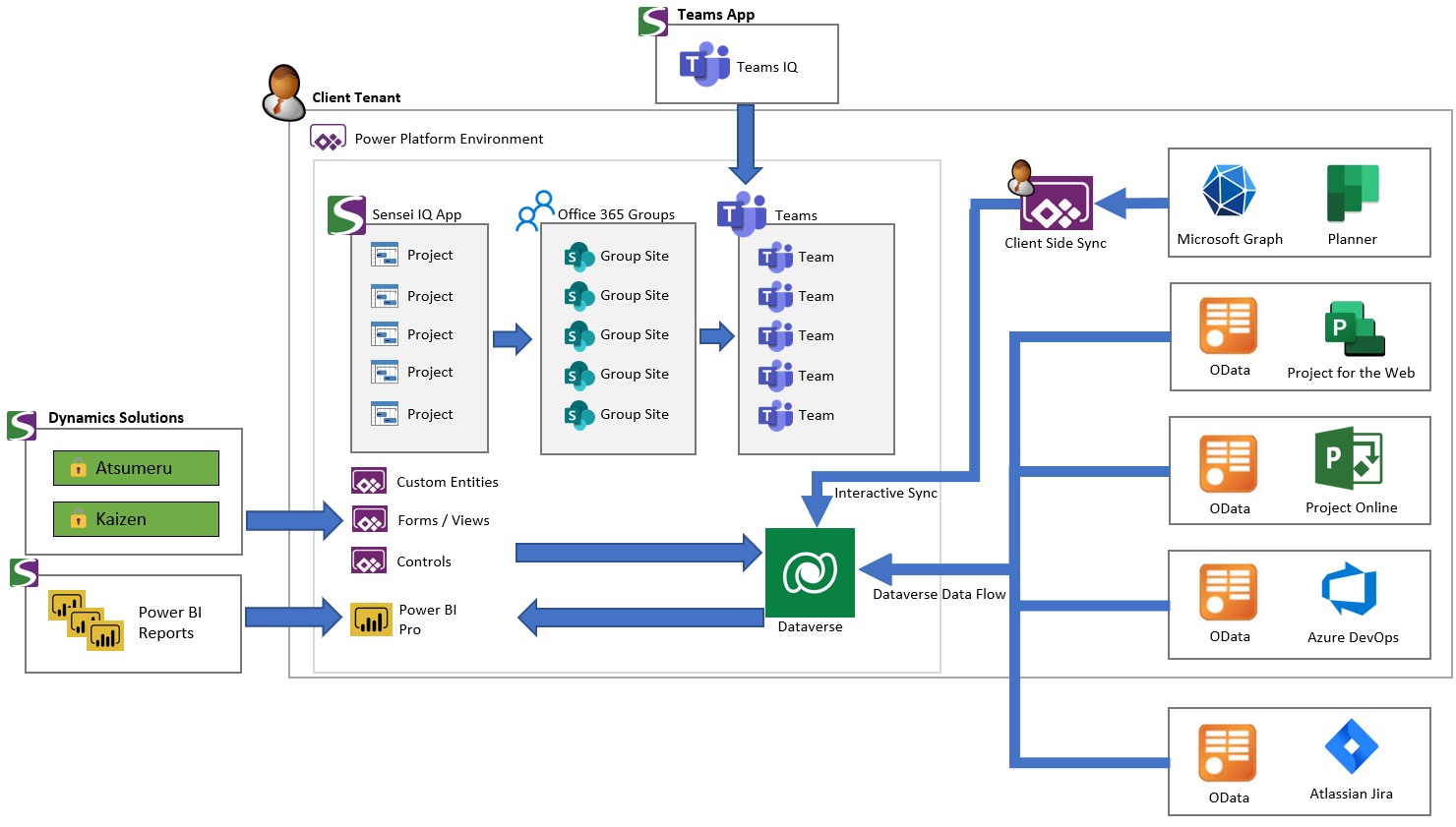
A high-level overview of the Sensei IQ architecture. All components are contained within your Microsoft 365 tenant.
Core Platform — Power Platform & Dataverse
Sensei IQ is built on Microsoft Power Platform, delivered as three managed Dynamics solutions deployed into a dedicated Power Platform environment within your tenant.
| Solution | Role |
|---|---|
| Controls | Core UI controls and shared components. |
| Kaizen | Configuration, settings, and governance framework. |
| Atsumeru | Primary solution — data model, business logic, automation, and integrations. |
The Sensei IQ model-driven app is the main interface for project managers, program managers, portfolio managers, and administrators. Two canvas apps — My Work and My Projects — are also deployed as part of the Atsumeru solution, providing lightweight personal workload views for individual contributors and team members.
Dataverse is the data layer — the database that underpins Power Apps. All Sensei IQ data (projects, programs, portfolios, resources, requests, and configuration) is stored in Dataverse tables within your Power Platform environment, governed entirely by your organization's own security and access policies.
Collaboration Layer — M365 Groups & Teams
Sensei IQ uses Microsoft 365 Groups as the collaboration backbone for projects, programs, and portfolios. When a project is linked to an M365 Group, it gains a dedicated SharePoint document library and a linked Microsoft Teams channel — providing a unified, governed collaboration hub without any additional configuration outside of Sensei IQ.
The Teams IQ app can be deployed to your organization's Teams client, surfacing Sensei IQ directly in Teams and enabling channel tabs that embed project data for team members in their flow of work.
For a full description of how the collaboration experience works, see Collaboration & Microsoft 365 Integration.
Reporting — Power BI
Sensei IQ includes a suite of Power BI reports published to a dedicated workspace within your tenant. These reports are embedded directly into the Sensei IQ interface, providing visibility across projects, portfolios, resources, and strategy without requiring users to navigate to Power BI separately.
For a full list of included reports, see What Gets Installed.
External System Sync
For organizations that manage project work in external tools, Sensei IQ supports two sync mechanisms depending on the tool.
Dataverse Dataflow Sync — most external work management tools (Azure DevOps, Jira, Planner Premium, Project Online, Wrike, Smartsheet, Monday.com, Asana, Trello, and Project Server) connect via OData-based Power Apps dataflows configured during deployment. These dataflows run on a scheduled basis using stored credentials and pull schedule, task, and assignment data into Dataverse.
Client-Side Sync — Microsoft Planner uses a different mechanism. Rather than a scheduled dataflow, Planner data is synchronized interactively using Microsoft Graph API calls in the context of the current user's session. This approach reflects the way Planner data is accessed within Microsoft 365.
For the full list of supported tools, see Supported Integrations.